
A designer’s sketch can become a set of detailed concept images before a single surface has been modeled in CAD. That gives a client more to react to: different viewing angles, a clearer sense of proportion, and a picture of how the product might look in use. It also leaves plenty of work ahead. Someone still has to determine whether the components fit, how the object feels in a person’s hands, and how its parts will be made and assembled.
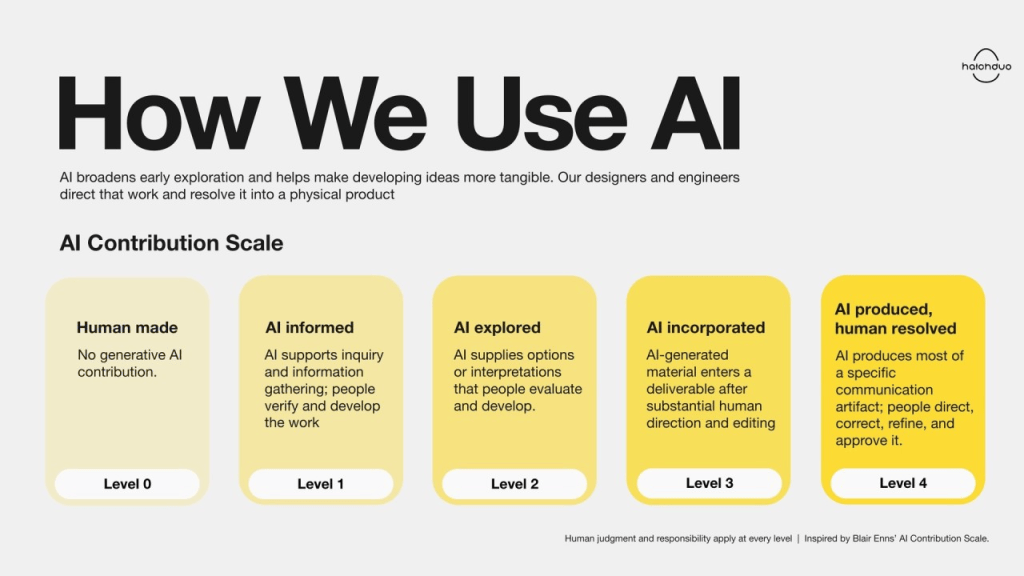
At Hatch Duo, we use AI to broaden exploration and make developing ideas more tangible. Our designers and engineers direct that work and resolve it into physical products. They retain decision authority throughout the process.
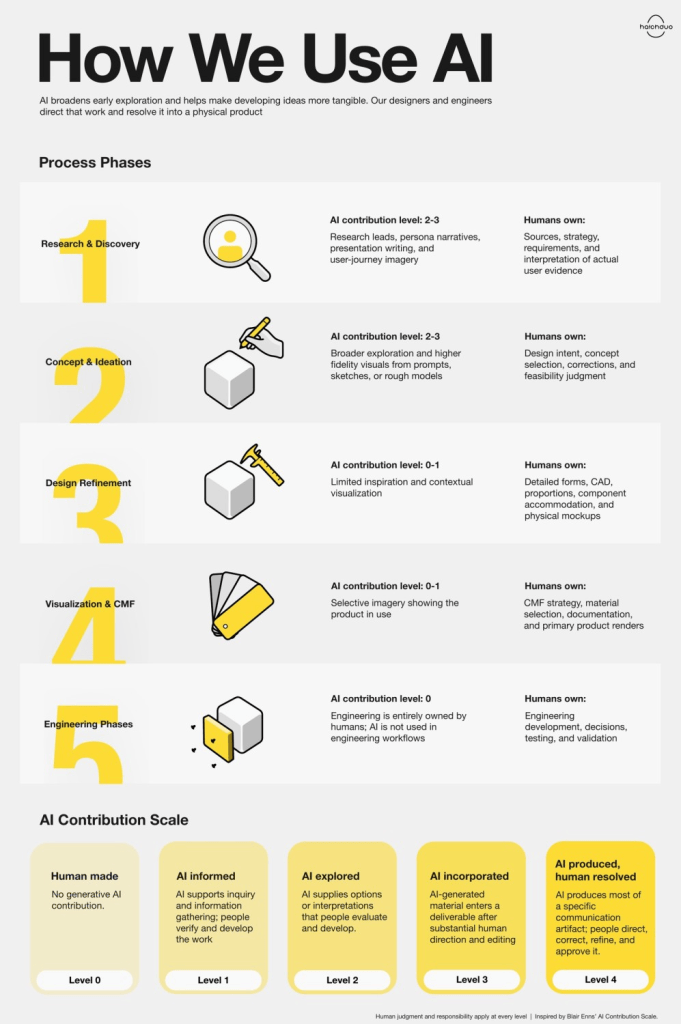
We wanted to explain that approach precisely, so we reviewed our AI use across three recent client projects. We focused on our team’s own use of AI tools. We traced what the tools contributed, what designers corrected or rejected, and what reached the client. The pattern was clear: AI contributed most substantially to discovery and concept exploration. As the work became more detailed and constrained, our team took increasingly direct control through CAD, physical mockups, material development, and engineering.
What AI adds to our process
The value we see is broader exploration, higher fidelity early communication, and deeper front-end inquiry. Designers can investigate more references, consider additional scenarios, and develop visuals that help a team discuss an idea before it has been fully modeled.
We are deliberately cautious about promising time savings. Projects have different requirements and some problems require much more direct human involvement. The more useful question is what AI enables us to examine or communicate within a particular stage of development.
Making the contribution visible
Inspired by Blair Enns’ AI Contribution Scale for writing, we developed a scale for product-development activities and deliverables:
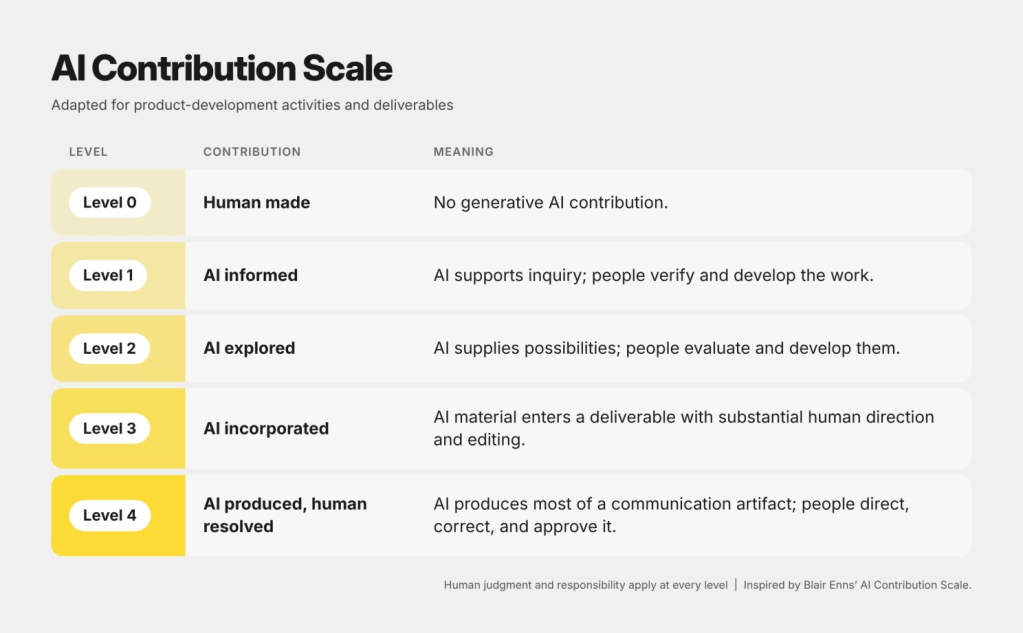
We use this scale to describe specific activities and deliverables, then estimate the typical contribution across each phase. A storyboard, a concept image, and a CAD model can have very different AI contributions within the same project. Contribution to the underlying design also differs from contribution to the image depicting it.
The estimates below connect the scale to our workflow. The typical level characterizes the phase’s substantive work; the task range captures the variation within it. These are qualitative judgments based on three project audits, rather than calculated averages or percentages of work completed by AI.
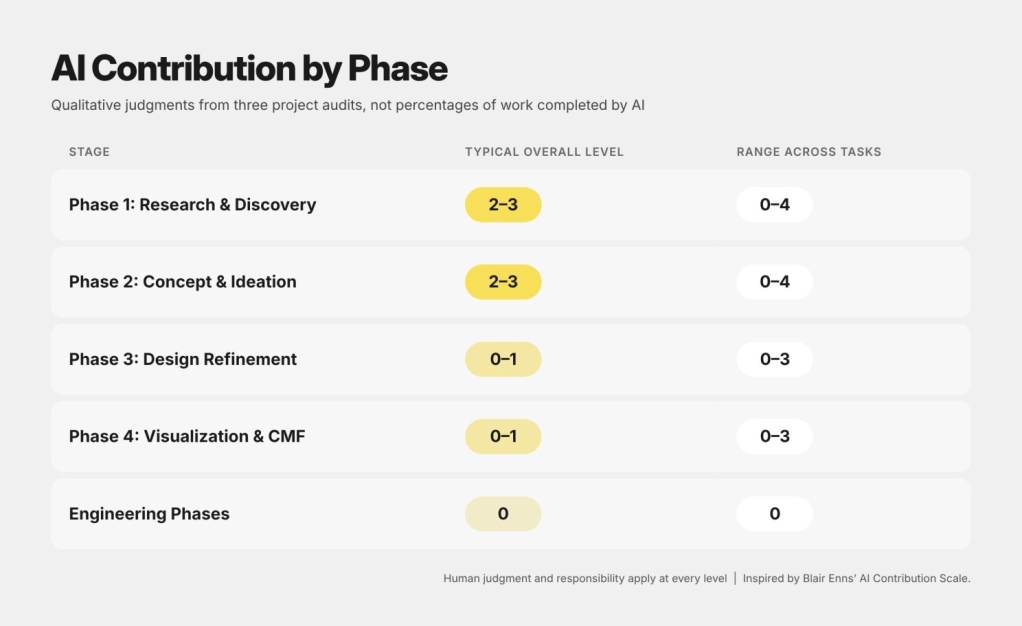
A high contribution to an individual supporting image does not mean AI drove the whole phase. These levels describe contribution, not technical validity. Human judgment and responsibility apply throughout, and the ranges will vary by project.
Phase 1: Research & Discovery
Typical contribution: Levels 2–3. Task range: 0–4.
We use AI to identify research leads, expand client-supplied persona narratives, draft presentation language, and visualize user journeys. Designers establish the questions, verify relevant product references, and decide which information belongs in the design strategy.
A storyboard can make an interaction easier to discuss. Our team defines the steps and directs the images, then curates and edits the results. The client can see the proposed sequence and help identify missing moments or assumptions.
That distinction matters with personas, too. A more detailed generated story can help us explore a scenario, but it is still a hypothesis. Actual user evidence comes from activities such as interviews, observation, and testing. On one audited project, the team visited a hospital and built physical mockups on-site. Those experiences informed the design directly, without AI involvement.
Phase 2: Concept & Ideation
Typical contribution: Levels 2–3. Task range: 0–4.
Designers use AI in different ways. Some begin with sketches and use Vizcom to develop them into more detailed visuals. Others generate imagery as a starting point, evaluate it, and develop selected ideas through sketching or rough 3D models.
Direction and correction are substantial parts of this work. In one project, a large collection of prompted images failed to match the required form factor. None went to the client. Designers discarded them or used individual qualities as inspiration.
On another, the team used an initial sketch to develop additional views and images of the product being worn. Designers corrected proportions, branding, and other mistakes before presenting the visuals. This gave the client a more complete picture of the concepts without requiring every view to be manually sketched or modeled first.
The final presentation varies by project. Sometimes corrected AI imagery communicates the concepts well. Sometimes designers model every presented concept and render it in KeyShot. The team chooses the approach that gives the client an appropriate basis for review.
Phase 3: Design Refinement
Typical contribution: Levels 0–1. Task range: 0–3.
Refinement requires direct control over the design. Our team builds CAD, resolves forms and proportions, accommodates internal components, and uses physical mockups to evaluate the object.
AI played a limited role here in the audited projects: some inspiration and selected contextual visuals. The detailed development was predominantly manual. A rendering may suggest a generous interior volume; CAD reveals whether the actual components can occupy it. A mockup lets us examine size and ergonomics in physical space.
These are decisions our designers make through the development work itself. That is why the phase sits near the human-made end of the scale overall, even when a supporting contextual image reaches Level 3.
Phase 4: Visualization & CMF
Typical contribution: Levels 0–1. Task range: 0–3.
Our designers establish the color, material, and finish strategy, develop or source rendering materials, and create primary product renders. AI can help place the product in a scene or show it on a user.
This is where the distinction between designing a product and depicting it becomes especially useful. An image can contain substantial AI-generated material while the product’s geometry and CMF are entirely designer-created. We describe those contributions separately. The core CMF and rendering work keeps the typical phase estimate at Levels 0–1, while AI-generated contextual imagery can bring individual tasks to Level 3.
Engineering Phases
Typical contribution: Level 0. Task range: 0.
Our engineering teams did not use AI tools directly in the engineering work covered by these audits. They developed CAD, solved problems, iterated, and made decisions. One of the projects is still underway, so that account reflects the work completed to date.
Our position for designers
One concern we hear about AI is that using it means giving up control. In our practice, control comes from setting the brief, choosing what to pursue, correcting the output, and deciding when a different tool is required. Designers retain that authority by exercising it throughout the work.
Our position is that AI will remain part of the design industry’s toolkit. Designers should learn to use it responsibly now. That means developing enough familiarity to recognize where it helps, where it creates extra work, and where direct execution is essential.
The skill is in the decisions: recognizing an unsuitable concept, correcting an appealing but misleading image, or moving into CAD because the next question requires precise geometry. AI gives us additional material to work with. Professional judgment determines what becomes part of the product.
What comes next
Hatch Duo continues to develop and evolve how we work with AI. We are exploring where new tools can deepen inquiry, extend creative exploration, and help clients see possibilities more clearly. As we learn, our workflows and the contribution ranges described here will evolve too. We will keep sharing what proves useful in practice.
The constant will be human decision authority. Whatever the tools can generate, the human designer will always have the final say on design direction and what reaches the client, with engineers retaining authority over engineering decisions and validation.
If you are developing a hardware product, we would welcome a conversation about what you need to explore, communicate, and resolve. Get in touch with Hatch Duo to discuss your project.

